Terminology and Core Abstractions
Terminology and Core Abstractions
AIStore documentation, CLI, APIs, and source code use a small set of recurring terms for the system’s core abstractions: buckets, targets, proxies, mountpaths, xactions, shards, and more.
This page defines those terms and links to the corresponding in-depth documentation where relevant. Use it as a reference when using the CLI, reading the docs, operating AIS clusters, or navigating the codebase.
Table of Contents
- Bucket
- Backend Provider
- Mountpath
- Proxy
- Endpoint
- Read-after-Write Consistency
- Xaction
- Shard
- Target
- Unified Namespace
- Write-through
Terms are listed alphabetically so you can quickly jump to the one you need.
Bucket
A bucket is a named container for objects - monolithic files or chunked representations - with associated metadata. It is the fundamental unit of data organization and data management.
AIS buckets are categorized by their provider and origin. Native ais:// buckets managed by this cluster are always created explicitly (via ais create or the respective Go and/or Python APIs).
Remote buckets (including s3://, gs://, etc., and ais:// buckets in remote AIS clusters) are usually discovered and auto-added on-the-fly on first access.
In a cluster, every bucket is assigned a unique, cluster-wide bucket ID (BID). Same-name remote buckets with different namespaces get different IDs.
Every object a) belongs to exactly one bucket and b) is identified by a unique name within that bucket.
Bucket properties define data protection (checksums, mirroring, erasure coding), chunked representation, versioning and synchronization with remote sources, access control, backend linkage, feature flags, rate-limit settings, and more.
AIS also defines system buckets - infrastructure buckets with reserved .sys-* names (e.g., ais://.sys-inventory), created automatically for internal services. See System Buckets.
See AIS Buckets: Design and Operations for complete description including: identity model, namespaces, lifecycle, and operations.
Backend Provider
Backend Provider is a designed-in backend interface abstraction and, simultaneously, an API-supported option that allows to delineate between remote and local buckets with respect to a given AIS cluster.
AIS supports multiple storage backends including its own (ais://@uuid or ais://@alias for remote clusters).
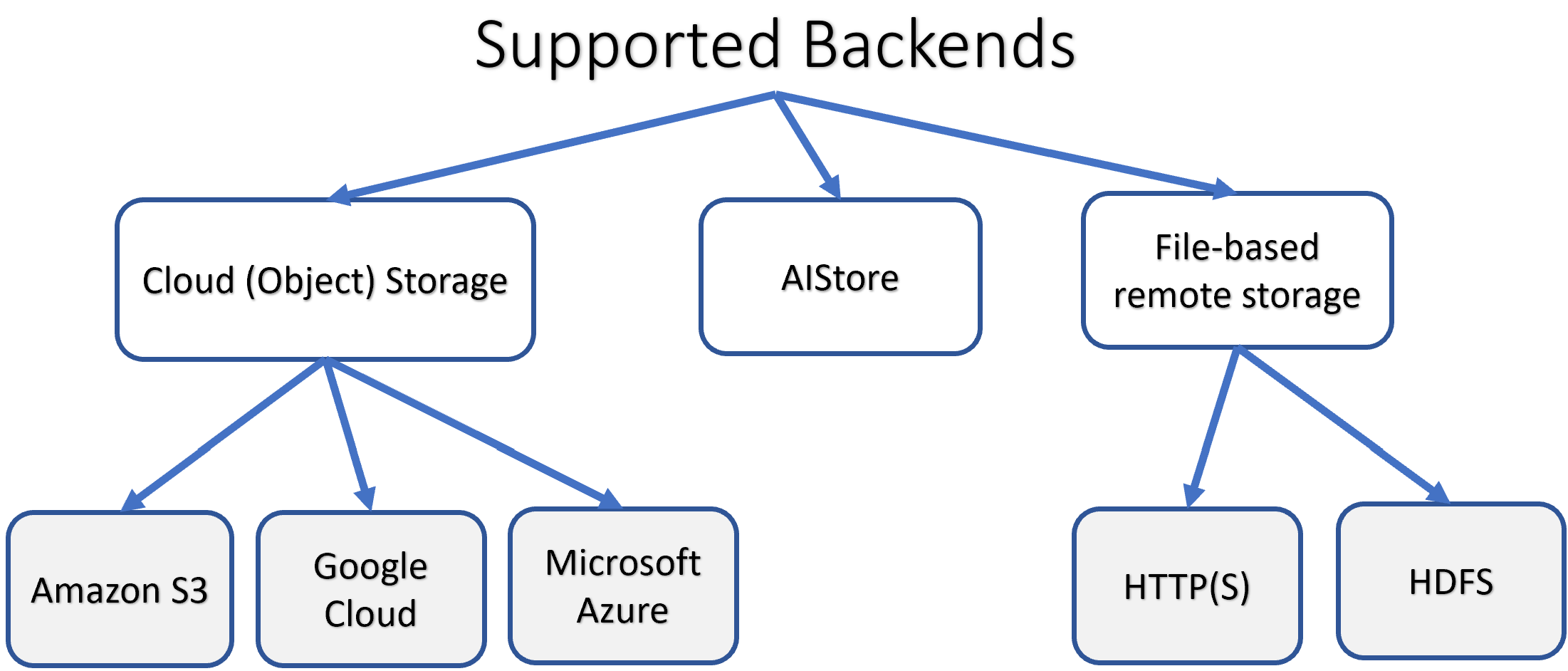
See providers for the current list of supported clouds and instructions on chaining AIS clusters.
Mountpath
AIS target mountpath is a formatted disk (or RAID volume) plus a directory that AIS fully owns for storing user data and system metadata.
- One mountpath per physical disk/RAID (no sharing).
- Mountpath directories cannot be nested.
- Mountpaths can be enabled / disabled and attached / detached at runtime to replace faulted drives, expand or shrink capacity with no downtime.
- In a typical deployment, total mountpaths = number of targets × disks-per-target.
Note on Kubernetes deployments: While AIStore natively supports hot-plugging mountpaths at runtime, this capability is limited in Kubernetes environments. Kubernetes (as of v1.33) does not support attaching new Persistent Volumes to running pods. In production Kubernetes deployments, adding new storage typically requires a controlled pod restart (meaning, zero-downtime is not possible without specialized extensions).
Mountpath Health Checking (FSHC)
AIS targets continuously monitor the health of their mountpaths using a lightweight Filesystem Health Checker.
FSHC detects I/O-level failures early, classifies them as FAULTED or DEGRADED, and immediately disables affected (faulted or degraded) mountpaths to preserve data integrity and cluster availability.
FSHC performs:
- root-level filesystem checks (with a single retry for network-attached storage),
- randomized read/write sampling under each mountpath,
- two-pass error evaluation with configurable thresholds,
- immediate disablement of mountpaths that exceed the allowed error limits.
For a detailed description and configuration guidance, see: Filesystem Health Checker
Proxy
A disk-less gateway that exposes the AIS REST and S3-compatible APIs.
- Proxies never see or touch user data in flight.
- Exactly one proxy is elected primary (leader); only the primary can update cluster-level metadata including the cluster map.
- The terms proxy and gateway are interchangeable.
- For symmetry we usually deploy one proxy per target, but that is not a requirement.
Endpoint
Cluster’s endpoint: HTTPS or HTTP address of any AIS proxy (gateway) in this cluster.
The options to specify AIS cluster endpoint include (but are not limited to):
- CLI configuration:
ais config cli(and lookupcluster.default_ais_host) AIS_ENDPOINTenvironment that, if present, overrides other defaults.
In a multi-node cluster it is strongly recommended to deploy load balancer on the front, to take advantage of the fact that AIS proxies provide identical APIs and can all be used simultaneously.
See also:
Read-after-Write Consistency
PUT(object) is a transaction. An object (or new version) becomes visible only after AIS has:
- Written the first local replica and its metadata.
- (For remote backends) completed remote
PUT(using the vendor SDK), stored remote metadata (in-cluster), and optionally validated checksums.
Subsequent reads through any gateway always return the same content. Extra replicas or erasure-coded slices are created asynchronously.
The same guarantee applies to every writing scenario, including cold-GET request(s), bucket copies, transforms, archives, prefetches, large-blob downloads, renames, promotions, and more.
Shard
In AIStore, sharding refers to the process of serializing original files and/or objects (such as images and labels) into larger-sized objects formatted as TAR, TGZ, ZIP, or TAR.LZ4 archives.
The benefits of serialization are well-established: iterable formats like TAR enable purely sequential I/O operations, significantly improving performance on local drives. In the context of machine learning, sharding enhances data shuffling and eliminates bias, allowing for global shuffling of shard names and the use of a shuffle buffer on the client side to ensure adequate randomization of training data.
Additionally, a shard is an object that can follow a specific convention, where related files (such as abc.jpeg, abc.cls, and abc.json) are packaged together in a single TAR archive. While AIS can read, write, and list any TAR, using this convention ensures that components necessary for ML training are kept together.
In short, sharding:
- Enables fully sequential I/O for high throughput.
- Ideal for ML workflows: global shuffling of shard names + client-side shuffle buffer eliminates bias.
- AIS can read, write, append, and list archives natively.
- Convention: related files (
abc.jpeg,abc.cls,abc.json, …) live in the same shard so all components stay together.
Further reading:
- Archive support
- CLI archive command
ishardtool- Distributed Shuffle
- WebDataset format: Hugging Face WebDataset docs
Target
A storage node in an AIS cluster.
- Stores user objects on one or more mountpaths.
In documentation and code, “target” always means “storage node in an AIS cluster.”
Unified Namespace
When AIS clusters are attached to each other they form a super-cluster with a single, global namespace: every bucket and object is reachable via any node in any member cluster. Clients use a single endpoint and reference shared buckets with cluster-specific identifiers.
Write-through
With remote backends, the remote PUT is part of the same write transaction that finalizes the first local replica.
If the remote PUT fails, the whole operation fails and AIS rolls back locally.
Xaction
Xaction (eXtended action) is AIStore’s abstraction for asynchronous batch jobs. All xactions expose a uniform API and CLI for starting, stopping, waiting, and reporting both generic and job-specific statistics.
Common jobs include erasure coding (EC), n-way mirroring, resharding, transforming a given virtual directory, archiving (sharding) multiple objects, copying remote bucket, and more:
$ ais show job --help
NAME:
   ais show job - Show running and/or finished jobs:

     archive        blob-download  cleanup     copy-bucket       copy-objects      delete-objects
     download       dsort          ec-bucket   ec-get            ec-put            ec-resp
     elect-primary  etl-bucket     etl-inline  etl-objects       evict-objects     evict-remote-bucket
     list           lru-eviction   mirror      prefetch-objects  promote-files     put-copies
     rebalance      rename-bucket  resilver    summary           warm-up-metadata