Native Bucket Inventory: Up to 17x Faster Remote Bucket Listing
AIStore 4.3 introduces Native Bucket Inventory (NBI), a new mechanism for accelerating large remote-bucket listings by turning a repeatedly expensive operation into a local, reusable metadata path. Instead of traversing a remote bucket on every ais ls, AIS can precompute the bucket inventory once, persist it as compact binary chunks in the cluster, and answer subsequent listing requests directly from that local snapshot.
In our benchmarks, NBI delivers roughly 15x to 17x speedup for repeated listing of an s3:// bucket with 3.2 million objects, highlighting how effective a precomputed local snapshot can be for large datasets. In this post, we walk through the design of NBI, the internal create and list workflows, the benchmark results, and how to use it from the AIStore Python SDK and CLI.
Table of Contents
- Motivation
- Workflow
- Usage
- Benchmark
- Current Limitations
- When to Use NBI (and When Not To)
- Conclusion
- References
Motivation
Remote bucket listing becomes expensive when the bucket is both large and repeatedly accessed. A full listing requires AIS to retrieve and assemble a large volume of object metadata from the backend before it can return a complete result to the client. When that bucket is relatively stable and listed again and again, the system ends up redoing essentially the same work each time, even though the contents change very little between requests.
The core issue is that the object metadata returned by listing is often reusable, but the system keeps rebuilding it from scratch. The larger the bucket, the more bandwidth, latency, and backend API work AIS must spend to reconstruct information it has effectively already seen.
NBI addresses that mismatch by treating the bucket listing results as cacheable metadata. Instead of rebuilding the full listing on every request, AIS captures it once, stores it locally in a compact form, and reuses that snapshot for subsequent listings.
While our benchmarks use S3, NBI is backend-agnostic and works identically with any remote backend — AWS S3, Google Cloud Storage, Azure Blob, OCI Object Storage, and remote AIS clusters.
Workflow
NBI runs in two phases: creation and listing.
Creation
When the user requests inventory creation, the proxy distributes the job to all targets. Each target independently walks the remote backend, but only keeps the entries whose names hash to that target. The entries are sorted, grouped into chunks of ~20K names each, encoded as compressed msgpack, and written to the AIS system bucket ais://.sys-inventory. The resulting object path follows the pattern {provider}/@#/{bucket}/inv-{uuid}.
Listing
When a list request carries the inventory flag, the proxy broadcasts to all targets instead of sending the request to the remote backend. Each target reads its local inventory chunks, binary-searches for the continuation token, and returns a page of entries. The proxy merges per-target pages to assemble a globally sorted result. No S3 calls are made.
Usage
Python SDK
from aistore import Client

client = Client("http://ais-endpoint:51080")
bck = client.bucket("my-bucket", provider="s3")

# Create the inventory (one time)
job_id = bck.create_inventory(name="trainset-v1", prefix="images/")
client.job(job_id).wait()

# List via inventory — no S3 calls made
page = bck.list_objects(inventory_name="trainset-v1", prefix="images/train/")
for entry in page.entries:
    print(entry.name)

# Clean up when no longer needed
bck.destroy_inventory(name="trainset-v1")
CLI
# Create inventory
$ ais nbi create s3://my-bucket

# Monitor creation
$ ais show job create-inventory

# Show inventory metadata
$ ais nbi show s3://my-bucket

# List via inventory
$ ais ls s3://my-bucket --inventory
$ ais ls s3://my-bucket --inventory --prefix images/train/

# Destroy inventory
$ ais nbi rm s3://my-bucket
Benchmark
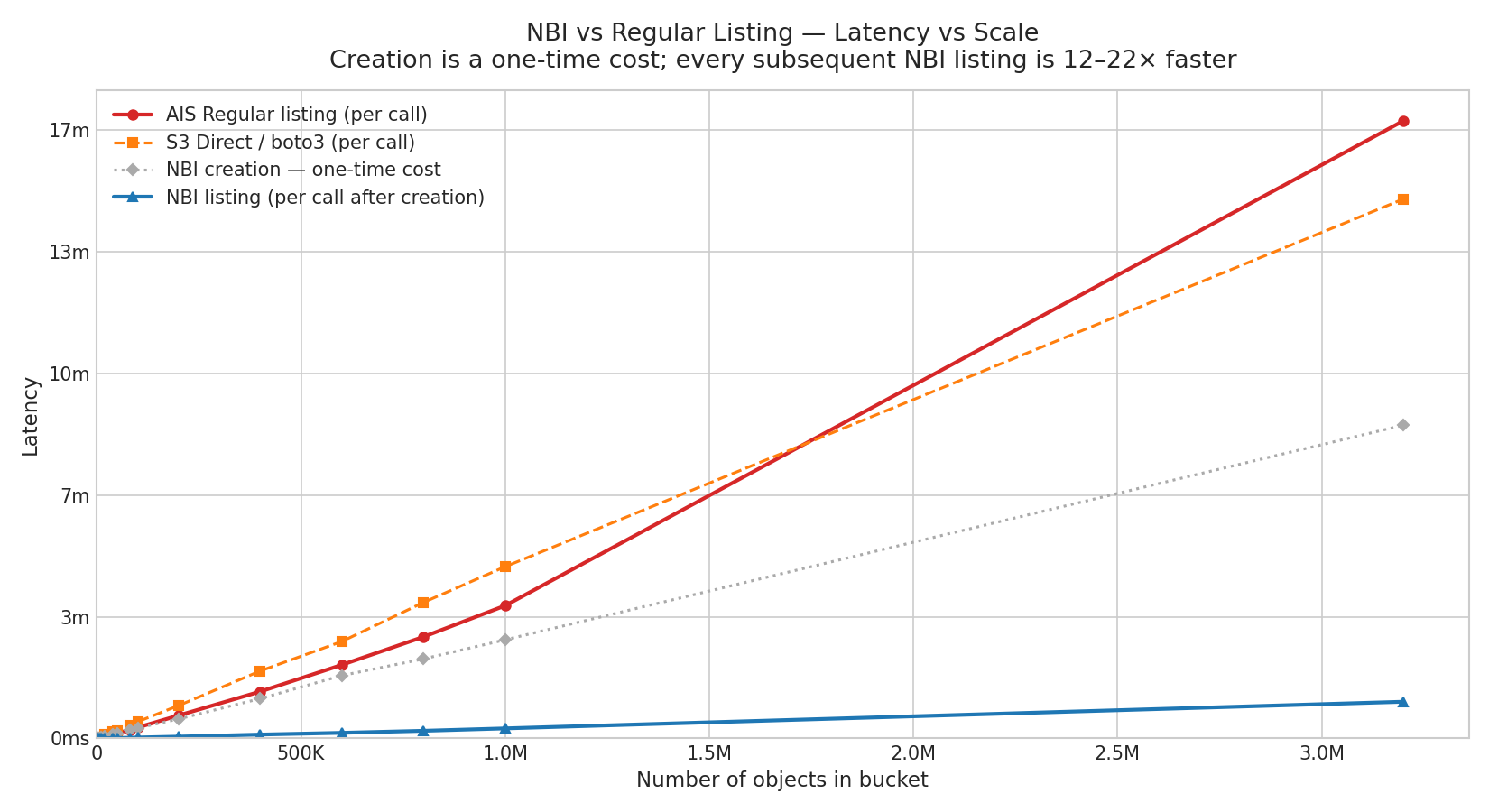
We measured listing latency across 15 scale points from 1K to 3.2M objects in an s3:// bucket, with 3 runs per point. The chart below shows p50 latency for AIS regular listing, S3 direct (boto3), NBI creation (one-time), and NBI listing.
==========================================================================================================================
NBI latency-vs-scale  (3 runs each)
==========================================================================================================================
Objects     Creation    Regular          NBI          S3 Direct    Speedup
                         p50      sd     p50     sd    p50      sd   (R/N)
--------------------------------------------------------------------------
   1K          449ms    405ms   144ms    21ms    2ms   676ms    2.9s  19.0x
   2K          616ms    596ms    21ms    34ms    4ms   480ms   251ms  17.6x
   5K          811ms     1.2s   161ms    51ms   33ms    1.4s   186ms  22.4x
  10K           1.8s     1.9s   177ms   147ms   35ms    2.7s   165ms  12.6x
  20K           3.5s     3.4s   106ms   248ms   20ms    6.2s   154ms  13.8x
  40K           7.2s     7.2s   358ms   550ms   95ms   10.8s   278ms  13.2x
  50K           8.6s     8.8s   689ms   631ms   30ms   12.9s   242ms  13.9x
  80K          13.9s    13.8s    1.1s    1.0s   22ms   21.4s   995ms  13.2x
 100K          17.0s    17.9s   387ms    1.4s   45ms   27.3s   822ms  12.6x
 200K          31.8s    37.6s    2.1s    2.9s  225ms   53.8s    6.6s  13.1x
 400K         1m  5s   1m 16s   364ms    6.3s  698ms  1m 50s    4.8s  12.3x
 600K         1m 43s    2m 0s    1.8s    9.1s  276ms  2m 39s    3.5s  13.3x
 800K         2m 10s   2m 46s    2.2s   12.5s  939ms  3m 43s   901ms  13.4x
   1M         2m 42s   3m 38s   920ms   16.4s  213ms  4m 42s   10.7s  13.3x
 3.2M         8m 34s  16m 55s    4.3s   1m 0s   2.8s 14m 46s   23.1s  16.9x
==========================================================================================================================
NBI listing latency still increases with object count because it scans locally stored inventory data, but its absolute latency remains far lower than regular listing. On the chart, the NBI curve appears almost flat compared to a regular AIS list or a direct S3 list. The speedup remains consistent across the entire 1K-3.2M range, reaching up to 16.9x at 3.2M objects.
Current Limitations
NBI is experimental in AIStore 4.3, and the current implementation keeps inventory management intentionally simple. At the moment, AIStore supports only one inventory per bucket, so concurrent inventories for the same bucket are not supported. Inventories are created manually via CLI or SDK and remain static until they are recreated or removed; if an inventory already exists and you want a new one, you can recreate it with --force, or simply remove it first with ais nbi rm and then create it again.
The current creation path is also optimized for correctness and simplicity rather than minimum backend work. During inventory creation, all targets walk the remote bucket in parallel and each keeps only its own portion of the results. Automatic refresh and more efficient creation strategies are planned for future releases.
Note: NBI replaces the older S3-specific
--s3-inventorypath, which depended on provider-generated CSV/Parquet inventory files. The new implementation is AIS-native, backend-agnostic, and does not require external tooling.
When to Use NBI (and When Not To)
Good fit:
- Large remote buckets (100K+ objects) that are listed repeatedly
- Training pipelines that enumerate a dataset before each epoch
- Data audits or dashboards that scan bucket contents periodically
- Any workflow where the bucket is relatively stable between listings
Not a good fit:
- Small buckets — creation cost exceeds the listing savings
- Rapidly changing buckets — the snapshot goes stale quickly, and frequent recreation negates the benefit
ais://buckets — metadata is already local (to each listing target), so NBI provides no speedup- One-off listings — if you only list a bucket once, the creation overhead is pure cost
Conclusion
NBI delivers 15x better listing performance for large remote buckets, with measured speedups reaching 14-22x across the range we tested. That makes it a practical solution for repeated listing of multi-million-object s3://, gs://, and other remote buckets where rebuilding the full result from the backend on every request is too slow and too expensive.