Parallel Download: 9x Lower Latency for Large-Object Reads
In AIStore 4.3, we introduced parallel download APIs to accelerate reads of large objects in an AIS cluster. Instead of pulling the entire object through one long sequential GET request stream, parallel download breaks the read into coordinated range-reads and fetches multiple chunks at the same time. Those chunks are then either consumed in order as a reader stream or written directly into their final offsets on the client side. By turning one serialized read path into many concurrent chunk transfers, parallel download can engage more disks on AIS targets, better utilize available network bandwidth, and significantly increase single-object throughput.
Our benchmarks confirm the impact: fetching a 128 GiB object via parallel download is up to 9x faster than a standard single-stream GET request. When integrated with PyTorch DataLoader, parallel download reduces per-batch fetch latency by 11x compared to single-stream GET on a 10 TiB bucket.
This post describes parallel download’s design, internal workflow, and the trade-offs behind its performance improvements. It also summarizes the current benchmark results and shows how to use it from the AIStore Python SDK and PyTorch.
Table of Contents
Motivation: Why Parallel Download Scales Better for Large Objects
The motivation for parallel download starts with a simple observation: once an object becomes large enough, reading it through one sequential GET leaves a lot of the cluster’s available bandwidth unused. Starting from AIStore 4.0, AIStore has supported chunked objects as a first-class storage representation: the cluster actively creates the chunks, places them across storage devices, and manages that layout internally. Once the object is stored that way, the natural next step is to build a read path that can exploit the layout instead of collapsing everything back into one serialized stream. That is the role of parallel download. It turns one logical object read into multiple coordinated chunk reads and, in practice, unlocks two distinct performance gains:
-
Breaking the Single-Disk Limit: A single disk can only deliver so much read throughput, often well below the bandwidth of a modern data-center NIC. If a large object is fetched as one sequential stream, read throughput is effectively capped by the disk serving that stream. AIStore’s chunked object representation removes that bottleneck by distributing object chunks across the target’s available disks, allowing one logical object read to engage multiple disks in parallel.
-
Taking Advantage of NVMe Parallelism: NVMe SSDs are built around deep queues and internal parallelism (NVMe Overview), so they perform best when multiple read requests are in flight at the same time. Parallel chunk reads give the device more work to schedule concurrently across its internal resources, which often raises effective read throughput well beyond what one long sequential request can sustain. This is exactly the behavior we will see later in the benchmark results.
Taken together, these two effects point to the same strategy: concurrent chunk fetching. The client needs to understand the object’s chunk boundaries and issue multiple range-read requests in parallel while preserving the correct chunk order at the destination. That is exactly what parallel download does. When the object is large enough, parallel download can improve single-object throughput both by engaging more of the cluster’s storage layout and by driving more of the underlying NVMe read parallelism.
Architecture and Workflow
Parallel download uses a coordinator-worker design, but it has two distinct execution patterns depending on whether the caller consumes the object as a stream or materializes the full object in memory.
1. Streaming Mode: Ring-Buffer Transfer
When the caller consumes the object incrementally, the parallel download API uses a bounded ring buffer to preserve ordered streaming semantics while multiple chunk fetches stay in flight.
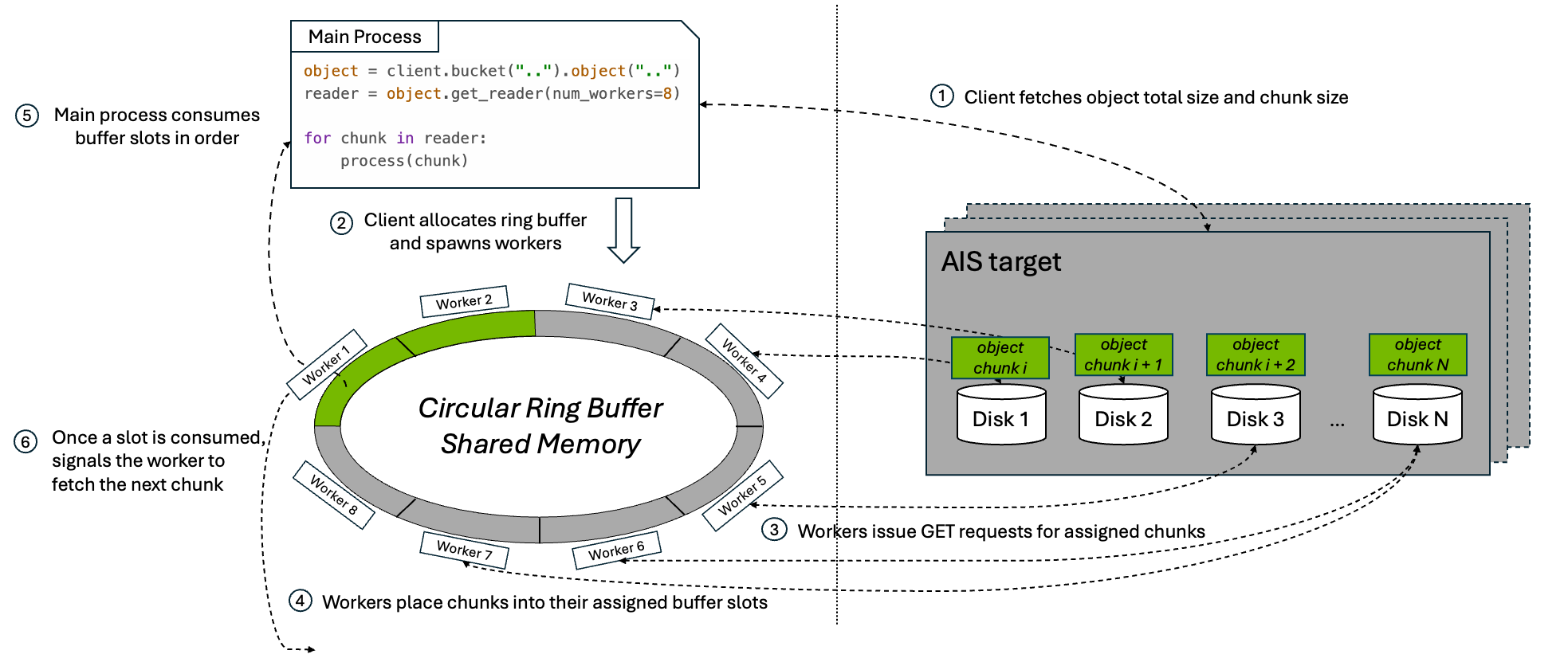
At a high level, the workflow is:
- The client issues a
HEADrequest to fetch the object’s metadata, including total object size and chunk size. - Parallel download allocates a shared buffer of size
num_workers * chunk_size, giving each worker one slot in the ring, and spawnsnum_workerssubprocesses. - Each subprocess worker issues range-read
GETrequests for its assigned chunk. - As chunks arrive, workers place them into their assigned buffer slots.
- The main process consumes the slots in order, preserving the original byte order of the object as it copies data into the reader output stream.
- Once a slot is fully consumed, the main process marks it reusable and signals the corresponding worker to fetch the next chunk.
This loop continues until the entire object has been streamed to the caller.
The ring-buffer design matters for two reasons:
- Bounded memory usage: the buffer stays fixed at
num_workers * chunk_sizeno matter how large the object is. - A full download pipeline: as soon as the consumer releases a slot, another range-read can begin, keeping the configured level of parallelism active until the final chunk is fetched.
2. Full-Object Mode: Direct Shared Memory
When the caller needs the full object materialized in memory, the parallel download API does not use the ring buffer. Instead, it allocates one shared-memory segment large enough to hold the full object and downloads directly into that destination.
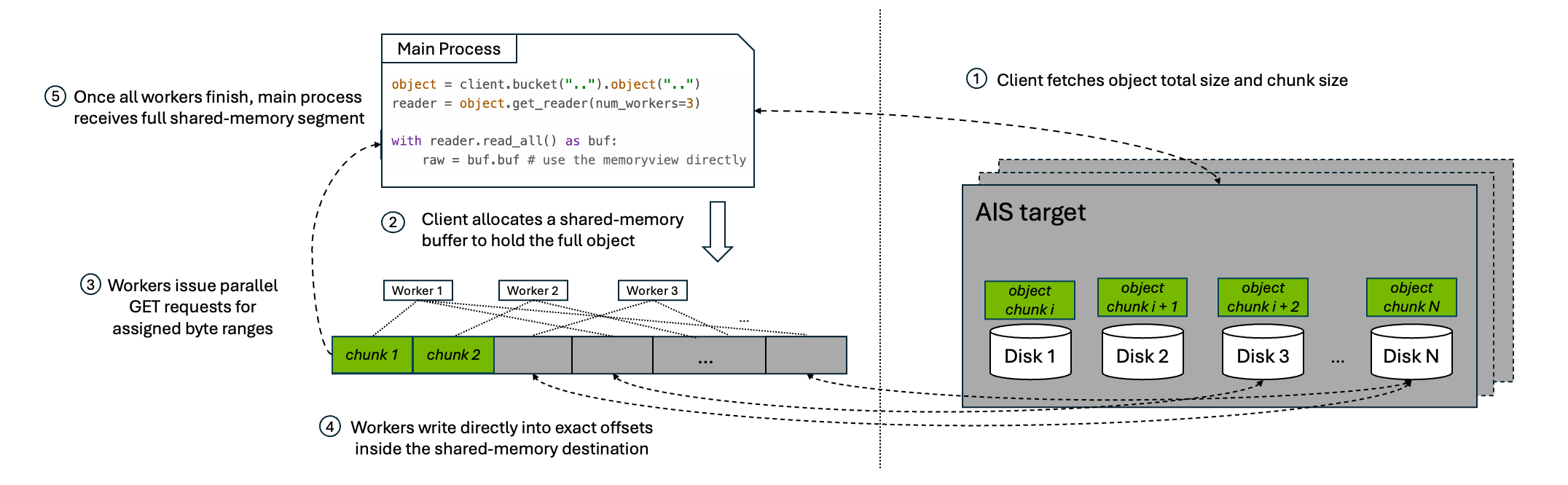
At a high level, the workflow is:
- The client issues a
HEADrequest to fetch the object’s metadata, including total object size and chunk size. - Parallel download allocates a shared-memory buffer to hold the full object.
- Worker subprocesses issue parallel range-read
GETrequests for their assigned byte ranges. - Each worker writes directly into its exact offset inside the final shared-memory destination.
- Once all workers finish, the caller receives a view over that full shared-memory segment.
This pattern avoids the extra copy from ring-buffer slots into a streaming output, but it trades that for a much larger memory reservation because the full object must fit in shared memory at once.
Usage
AIStore currently exposes parallel download through four interfaces: the Python SDK, PyTorch integration, the native Go API, and the CLI.
Python SDK
Use get_reader(num_workers=...) to enable parallel download for a single object read. The returned reader can be consumed as a streaming iterator:
from aistore import Client

client = Client("AIS_ENDPOINT")
bucket = client.bucket("my_bucket")

reader = bucket.object("large-object.bin").get_reader(num_workers=8)
for chunk in reader:
    # ...process the chunk
If your application needs the entire object materialized in memory, the same reader also supports read_all(). It returns a ParallelBuffer backed by shared memory. From there, you can either copy into a regular bytes object or access the underlying buffer directly and avoid the extra copy:
with bucket.object("large-object.bin").get_reader(num_workers=8).read_all() as buf:
    raw = buf.tobytes()  # option 1: copy into a new bytes object
    raw = buf.buf        # option 2: use the memoryview directly
Note:
read_all()does not use the streaming ring buffer. It allocates a full-size shared-memory segment for the object and downloads the entire object into that buffer. On Linux, those shared-memory objects are normally created through POSIX shared memory and exposed via/dev/shm. As a result, very large objects can consume shared-memory capacity quickly and also contribute to overall memory pressure. If you use this path on Linux, monitor/dev/shmusage during testing, for example withdf -h /dev/shm. Prefer the streaming iterator when the full object does not need to be materialized in memory at once.
Use Case: High-throughput reads for a single large object from an AIS cluster.
PyTorch Integration
AISParallelMapDataset plugs directly into the standard PyTorch DataLoader. Each __getitem__ call downloads one object using parallel range-reads and returns a ParallelBuffer:
from torch.utils.data import DataLoader
from aistore import Client
from aistore.pytorch import AISParallelMapDataset

bucket = Client("AIS_ENDPOINT").bucket("training-data")
dataset = AISParallelMapDataset(bucket, num_workers=8)

loader = DataLoader(dataset, batch_size=8, num_workers=2, collate_fn=lambda x: x)
for batch in loader:
    for name, buf in batch:
        tensor = torch.frombuffer(buf.buf, dtype=torch.float32)
        # ...train on tensor
        buf.close() # must be closed to avoid resource leak
Note: There are two different
num_workerssettings here, and they control different kinds of parallelism.AISParallelMapDataset(..., num_workers=N)controls the workers used inside each object download.DataLoader(..., num_workers=M)controls PyTorch subprocesses that prefetch samples across the batch pipeline. Setting both to high values multiplies total concurrency, which can oversubscribe CPU resources and make shared-memory buffer lifetime harder to manage. In practice, treat these as two knobs competing for the same client-side resources, not as independent speedups you can increase without limit.
Use Case: Loading large objects (video tensors, audio clips, high-resolution images) into a PyTorch training pipeline where per-sample download latency is the bottleneck.
Go API: Stream Mode
The Go streaming variant is api.MultipartDownloadStream(). It is the Go equivalent of the Python reader-based API: it returns an io.ReadCloser and performs concurrent range-reads behind the scenes while keeping only a bounded ring buffer in memory.
reader, attrs, err := api.MultipartDownloadStream(bp, bck, objName, &api.MpdStreamArgs{
    NumWorkers: 8,
    ChunkSize:  8 * cos.MiB,
})
if err != nil {
    return err
}
defer reader.Close()

_, err = io.Copy(dst, reader)
Use Case: The Go interface for the same reader-based parallel-download workflow.
CLI
The AIS CLI exposes parallel download through the --mpd option for large-object downloads. Under the hood, it uses the Go direct-write API api.MultipartDownload(), which writes each chunk directly into its final offset in the destination file.
Use Case: Downloading a large object directly into a local file or other seekable destination with minimal client-side buffering.
# Use `--mpd` option to download a single large object with parallel chunk fetching.
$ ais get ais://my-bucket/large-object.bin /tmp/large-object.bin --mpd --num-workers 8
Benchmark
The following measurements show how much performance parallel download can unlock in practice.
1. Single Large-Object Read
Results in this section were produced with the single-object benchmark script. We evaluated single large-object reads on two AIStore clusters. Both used the same overall configuration:
- Kubernetes Cluster: 3 bare-metal nodes, each hosting one AIS proxy (gateway) and one AIS target (storage server)
- Benchmark Client: 1 client machine
- Benchmark Object: one 128 GiB object
- Target CPU: 48 cores per node
- Target Memory: 995 GiB per node
- Client CPU: 48 cores
- Client Memory: 995 GiB
- Client Network Bandwidth: 100 Gbps
The two environments differed mainly in storage media and capacity:
NVMe-based Cluster: 16 × 5.8 TiB NVMe SSDs per Target
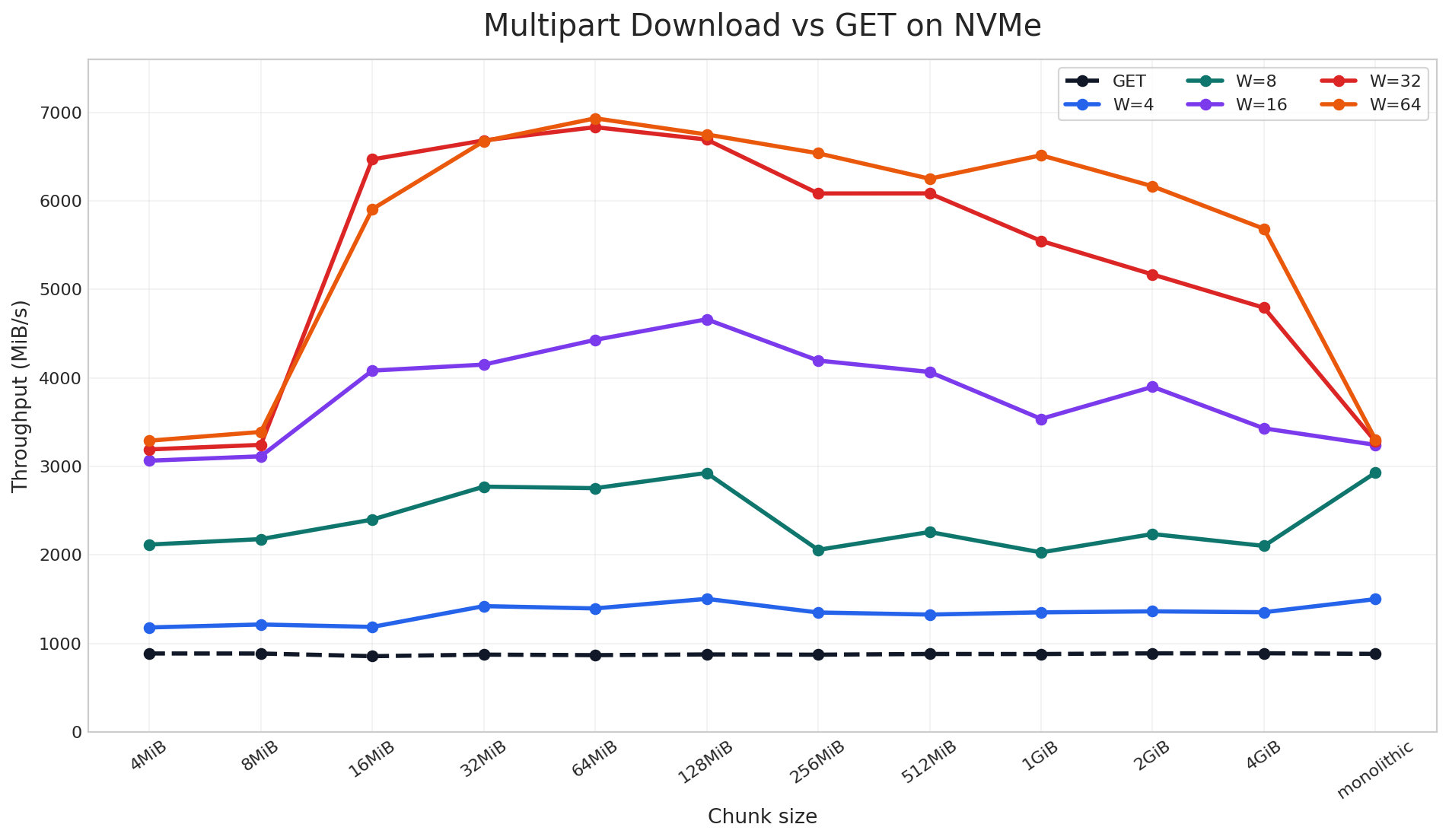
On the NVMe cluster, parallel download reached up to 9x speedup over a standard single-stream GET in the large-object benchmark. The chart includes both chunked and non-chunked cases: the monolithic label means the object was stored as a regular non-chunked object, while the other labels are AIS chunk sizes used to distribute the object across disks. Across that full sweep, once multiple read requests are in flight, throughput rises sharply across nearly all chunk sizes. The best results come from combining sufficiently large chunks with enough workers to keep the device busy, which is the NVMe parallelism discussed earlier.
HDD-based Cluster: 10 × 9.1 TiB Drives per Target
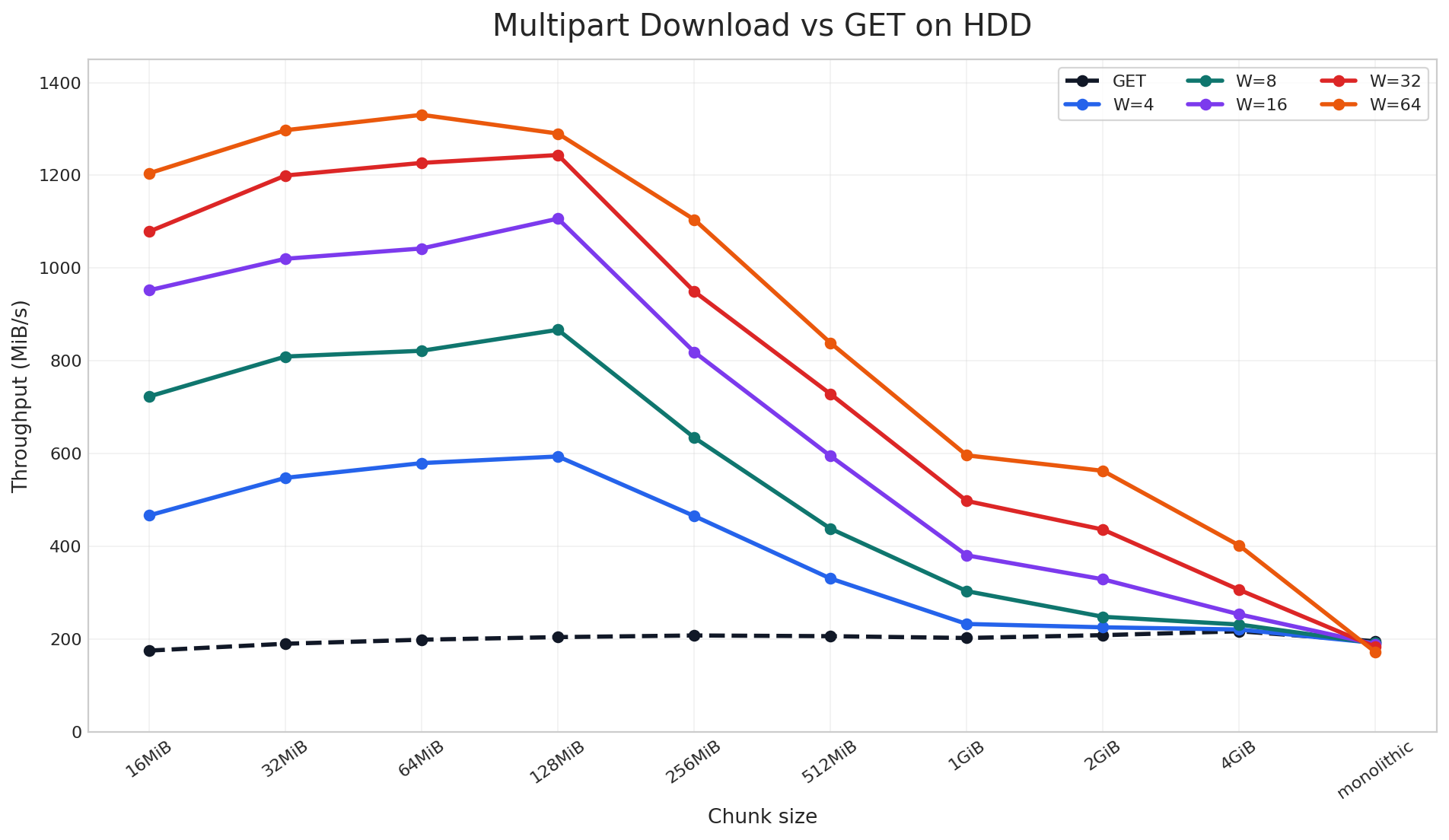
On the HDD cluster, parallel download still delivered up to 6.9x speedup, but the pattern is different. Here, the gain depends much more on the object being properly chunked across disks so that parallel download can read from multiple devices in parallel. Unlike NVMe, HDDs do not provide the same internal parallelism, so the improvement is more sensitive to chunk size and tapers off sooner for very large chunks.
Taken together, these two charts show that parallel download does not have a single best configuration that works everywhere. The optimal chunk size and worker count depend on your client-side resources, storage media, and object size distribution. For that reason, we encourage users to benchmark a small set of chunk-size and worker combinations on their own workload, find the sweet spot, and then use that setting for the full training or data-loading job. In our case, the best region was around 64-128 MiB chunks with 64 workers, and we will carry that tuning into the next benchmark.
2. Full Data-Loading Job via PyTorch
Results in this section were produced with the PyTorch data-loading benchmark script. To measure end-to-end impact, we ran that benchmark on the same NVMe-based cluster described above. The workload used a 10.61 TiB bucket containing 1,589 large training-sample objects ranging from 2.51 GiB to 17.32 GiB (average 6.84 GiB).
Based on the single-object benchmark, 64 MiB was the best chunk size on this cluster, so we rechunked the dataset before running the job:
$ ais bucket rechunk ais://mpd-bench --chunk-size 64MiB --objsize-limit 1
We then compared two end-to-end configurations over 64 batches with batch_size=8:
- GET: standard single-stream reads via
AISMapDataset - Parallel: per-object parallel downloads via
AISParallelMapDatasetwithworkers=48
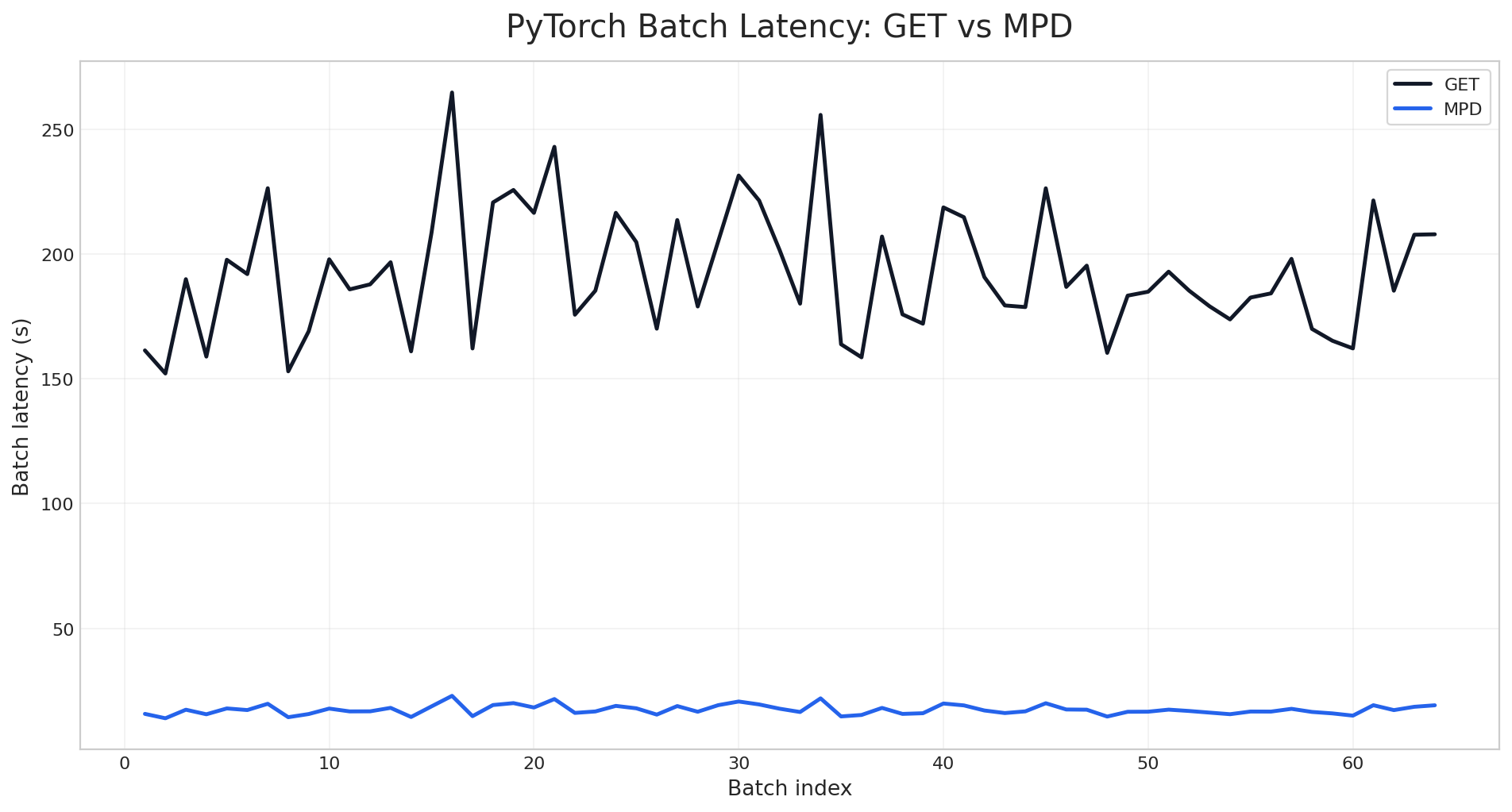
As measured by the PyTorch data-loading benchmark script, the per-batch latency chart shows a clean separation between the two modes across the entire run. Standard GET stays in the 150-265 second range per batch, while the parallel mode stays near 14-23 seconds. The gap is not limited to a few outliers or warm-up effects; it persists across all 64 batches.
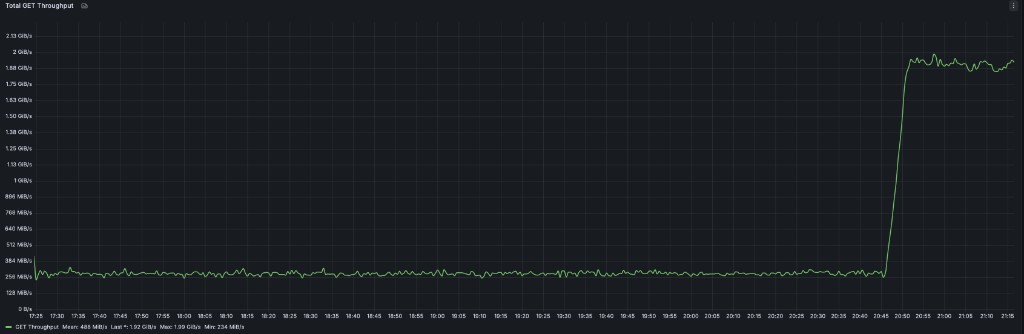
The same pattern is visible at the cluster level. During the benchmark run, total GET throughput stays near the single-stream baseline while the GET phase is running, then jumps sharply when the parallel phase begins:
$ AIS_ENDPOINT=<cluster-endpoint> AIS_BUCKET=mpd-bench BATCH_SIZE=8 NUM_BATCHES=64 AIS_WORKERS=48 python3 python/tests/perf/pytorch/parallel_download.py
Bucket: ais://mpd-bench
Objects: 1589  total=10865.5 GiB  avg=6.84 GiB  min=2.51 GiB  max=17.32 GiB
Config:  batch_size=8  num_batches=64  parallel_workers=48
...
                               GET    Parallel   Speedup
──────────────────────────────────────────────────────────
Throughput (GiB/s)            0.28        3.09     11.0x
Samples/sec                   0.04        0.46     11.0x
Total wall time (s)       12322.12     1117.81     11.0x
Batch latency mean (s)      192.53       17.47     11.0x
Batch latency med (s)       187.31       17.23     10.9x
Batch latency p95 (s)       231.40       20.74     11.2x
Time-to-first-batch (s)     161.36       15.79     10.2x
The same gap appears in the aggregate results. The parallel mode raises throughput from 0.28 GiB/s to 3.09 GiB/s, cuts mean batch latency from 192.53s to 17.47s, and reduces total wall time from 12,322s to 1,118s. Across the full benchmark, the improvement stays consistently around 10-11x.
Conclusion
Parallel download gives AIStore a parallel read path for large objects by turning one logical GET into multiple coordinated chunk fetches. In practice, that allows the client to take advantage of chunked object placement across disks and, on NVMe-based systems, to drive much more of the storage device’s internal read parallelism.
In our benchmarks, parallel download improved single-object throughput by up to 9x and reduced PyTorch per-batch latency by about 11x. Those gains carried through from synthetic single-object reads to a realistic end-to-end data-loading job, showing that parallel download can translate directly into shorter training input pipelines when large objects dominate the workload.