Blob Downloader: Accelerate Remote Object Fetching with Concurrent Range-Reads
In AIStore 4.1, we extended blob downloader to leverage the chunked object representation and speed up fetching remote objects. This design enables blob downloader to parallelize work across storage resources, yielding a substantial performance improvement for large-object retrieval.
Our benchmarks confirm the impact: fetching a 4GiB remote object via blob downloader is now 4x faster than a standard cold-GET. When integrated with the prefetch job, this approach delivers a 2.28x performance gain compared to monolithic fetch operations on a 1.56TiB S3 bucket.
This post describes the blob downloader’s design, internal workflow, and the optimizations that drive its performance improvements. It also outlines the benchmark setup, compares blob downloader against regular monolithic cold GETs, and shows how to use the blob downloader API from the supported clients.
Table of Contents
Motivation: Why Blob Downloader Scales Better for Large Object?
Splitting large objects into smaller, manageable chunks for parallel downloading is a proven strategy to increase throughput and resilience. In fact, cloud providers like AWS and GCP explicitly recommend concurrent range-read requests for optimal performance. The core advantages include:
-
Isolating Failures and Reducing Retries: With a single sequential stream, a network hiccup can force a restart or large rollback. With range-reads, failures are isolated to individual chunks, so only the affected chunk needs to be retried.
-
Leveraging Distributed Server Throughput: Cloud objects are typically spread across many disks and nodes. Concurrent range-reads allow the client to pull data from multiple storage nodes in parallel. This aligns with the provider’s internal architecture and bypasses the single-node or per-disk I/O limits.
Beyond these standard benefits, AIStore leverages the concurrent range-read pattern to unlock an architectural advantage: chunked object representation. Introduced in AIStore 4.0, this capability allows objects to be stored as separate chunk files, which are automatically distributed across all available disks on a target. This enables the blob downloader to stream each range-read payload directly to a local chunk file, achieving zero-copy efficiency and aggregating the full write bandwidth of all underlying disks.
Architecture and Workflow
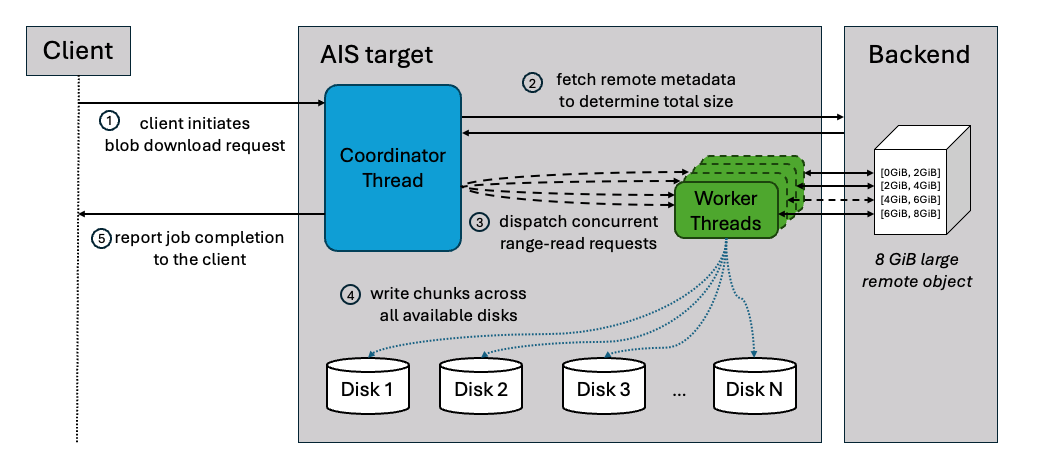
The blob downloader uses a coordinator-worker pattern to execute the download process. When a request is initiated, the main coordinator thread fetch the remote object’s metadata to determine its total size and logically segments it into smaller chunks.
This is the same general pattern often referred to as a worker pool, a work-queue with a pool of workers, or a producer–consumer pipeline.
Once the segmentation is complete, the coordinator initializes a pool of worker threads and begins dispatching work. It assigns specific byte ranges to available workers, who then independently issue concurrent “Range Read” requests to the remote storage backend.
As workers receive data, they write each chunk directly to separate local files and report back to the coordinator to receive its next assignment. This continuous loop proceeds until every segment of the object has been successfully persisted.
Load-Aware Runtime Adaptation
Blob downloader is wired into AIStore’s load system, which continuously grades node pressure (memory, CPU, goroutines, disk) and returns throttling advice.
At a high level, blob downloader:
- checks load once before starting a job and may reject or briefly delay it when the node is already under heavy memory pressure,
- derives a safe chunk size from current memory conditions instead of blindly honoring the user’s request, and
- lets workers occasionally back off (sleep) when disks are too busy while downloads are in progress.
The result is that blob downloads run at full speed when the cluster has headroom, but automatically slow down instead of pushing the node into memory or disk overload.
Usage
AIStore exposes blob download functionality through three distinct interfaces, each suited to different use cases.
1. Single Object Blob Download Job
Start a blob download job for one or more specific objects.
Use Case: Direct control over blob downloads, monitoring individual jobs.
AIS CLI Example:
# Download single large object
$ ais blob-download s3://my-bucket/large-model.bin --chunk-size 4MiB --num-workers 8 --progress
blob-download[X-def456]: downloading s3://my-bucket/large-model.bin
Progress: [████████████████████] 100% | 50.00 GiB/50.00 GiB | 2m30s

# Download multiple objects
$ ais blob-download s3://my-bucket --list "obj1.tar,obj2.bin,obj3.dat" --num-workers 4
2. Prefetch + Blob Downloader
The prefetch operation is integrated with blob downloader via a configurable blob-threshold parameter. When this threshold is set (by default, it is disabled), prefetch routes objects whose size meets or exceeds the value to an internal blob-download job, while smaller objects continue to use standard cold GET.
Use Case: Batch prefetching of remote buckets where some objects are very large, letting the job automatically decide when to engage blob downloader behind the scenes.
AIS CLI Example:
# List remote bucket
$ ais ls s3://my-bucket
NAME             SIZE            CACHED
model.ckpt       12.50GiB        no
dataset.tar      8.30GiB         no
config.json      4.20KiB         no

# Prefetch with 1 GiB threshold:
# - objects ≥ threshold use blob downloader (parallel chunks)
# - objects < threshold use standard cold GET
$ ais prefetch s3://my-bucket --blob-threshold 1GiB --blob-chunk-size 8MiB
prefetch-objects[E-abc123]: prefetch entire bucket s3://my-bucket
3. Streaming GET
The blob downloader splits the object into chunks, downloads them concurrently into the cluster, and simultaneously streams the assembled result to the client as it arrives.
Use Case: Stream a large object directly to the client while simultaneously caching it in the cluster.
Python SDK Example:
from aistore import Client
from aistore.sdk.blob_download_config import BlobDownloadConfig

# Set up AIS client and bucket
client = Client("AIS_ENDPOINT")
bucket = client.bucket(name="my_bucket", provider="aws")

# Configure blob downloader (4MiB chunks, 16 workers)
blob_config = BlobDownloadConfig(chunk_size="4MiB", num_workers="16")

# Stream large object using blob downloader settings
reader = bucket.object("my_large_object").get_reader(blob_download_config=blob_config)
print(reader.readall())
Benchmark
The benchmark was run on an AIStore cluster using the following system configuration:
- Kubernetes Cluster: 3 bare-metal nodes, each hosting one AIS proxy (gateway) and one AIS target (storage server)
- Storage: 16 × 5.8 TiB NVMe SSDs per target
- CPU: 48 cores per node
- Memory: 995 GiB per node
- Network: dual 100 GbE (100000 Mb/s) NICs per node
1. Single Blob Download Request
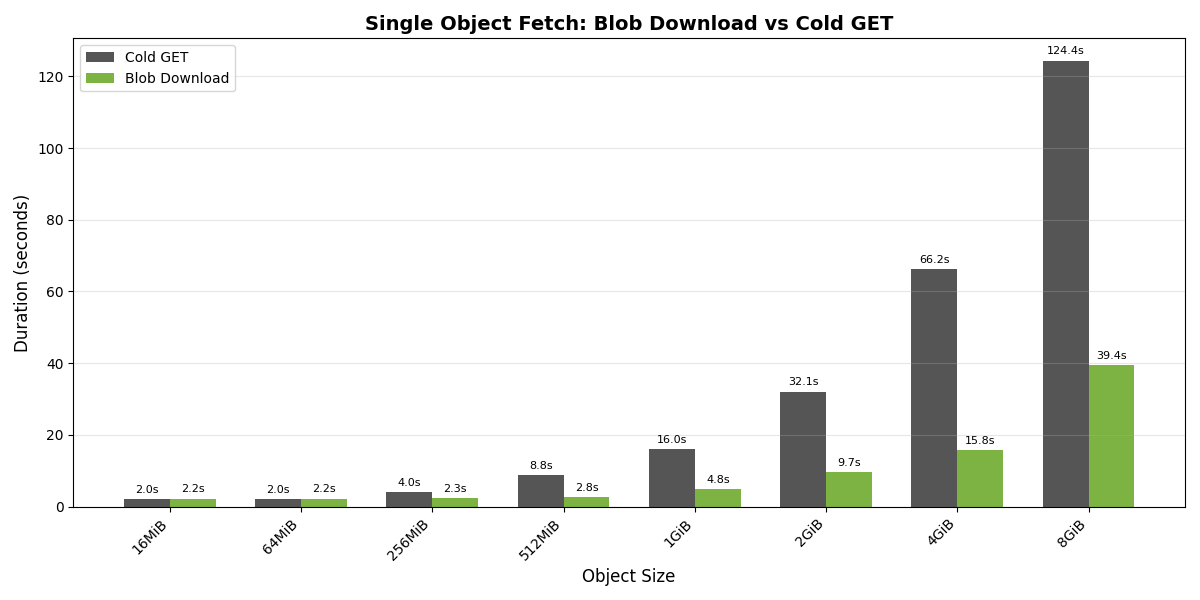
The chart above compares the time to fetch a single remote object using blob download versus a standard cold GET across a range of object sizes (16 MiB to 8 GiB).
For smaller objects, cold GET performs slightly better due to the coordination overhead inherent in blob download. However, once objects exceed 256 MiB, blob download begins to show significant advantages. The speedup grows significantly with object size.
These results validate the architectural benefits discussed earlier: concurrent range-read requests combined with distributed chunk writes deliver substantial gains for large objects.
2. Prefetch with Blob Download Threshold
In the prefetch benchmark, we created an S3 bucket containing 4,443 remote objects, ranging from 10.68 MiB to 3.53 GiB in size, for a total remote footprint of 1.56 TiB.
$ ais bucket summary s3://ais-tonyche/blob-bench
NAME                     OBJECTS (cached, remote)        OBJECT SIZES (min, avg, max)            TOTAL OBJECT SIZE (cached, remote)
s3://ais-tonyche         0    4443                       10.68MiB   305.77MiB  3.53GiB           0         1.56TiB
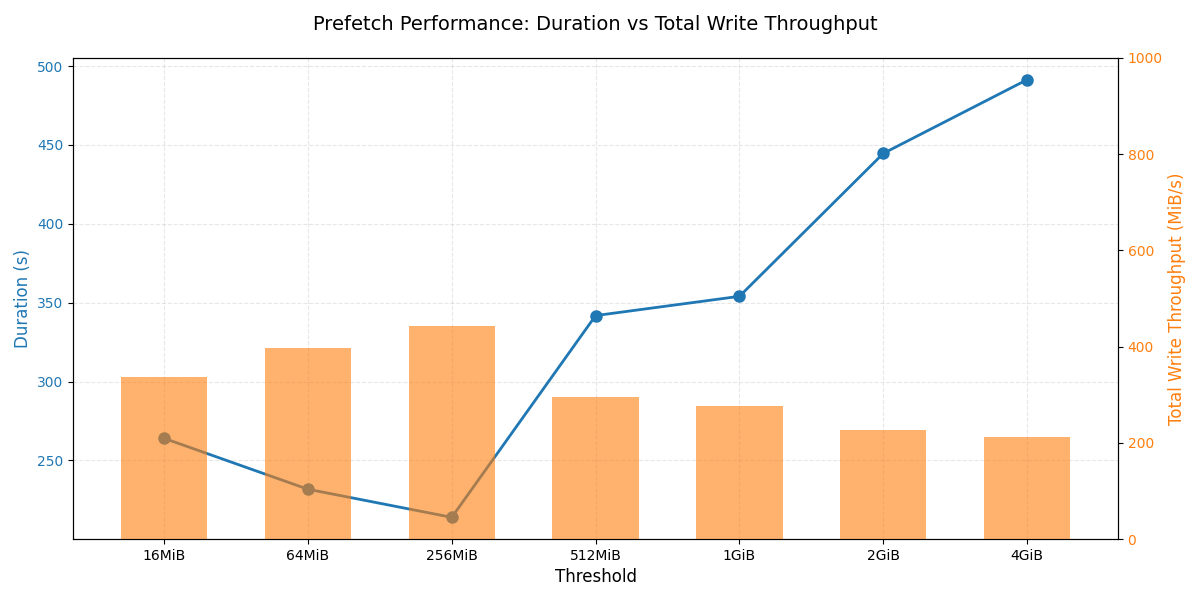
The chart above compares different --blob-threshold values for this mixed-size workload and reports both total prefetch duration and aggregate disk write throughput. In our environment, a threshold around 256 MiB strikes the best balance by routing large objects through blob download while letting smaller objects use regular cold GET.
- If the threshold is set too high: blob downloader is underutilized because more parallelizable large objects fall back to monolithic GETs.
- If the threshold is set too low: blob downloader is overused on small objects, flooding the system with chunked downloads and adding coordination overhead without improving throughput.
Across all thresholds, the key pattern is that assigning a reasonable share of large objects to blob downloader raises aggregate disk write throughput, which in turn shortens total prefetch time. When the threshold is tuned so that genuinely large objects are handled via blob download, the cluster is able to drive the highest parallel writes across targets. In our setup, a threshold of about 256 MiB achieved this balance, delivering a 2.28× shorter prefetch duration than a pure monolithic cold GET of the same bucket.
Conclusion
The key takeaway is simple: on real workloads with multi‑GiB objects, blob downloader reduces time to fetch large remote objects by up to 4× in our benchmarks. It achieves this by driving much higher aggregate disk throughput than a single cold GET can sustain.
Benchmarks also show that performance is highly sensitive to the --blob-threshold setting: in our 1.56 TiB S3 bucket, a threshold around 256 MiB maximized disk write throughput during the prefetch job. The ideal value in your deployment will depend on cluster configuration, network conditions, backend provider, and object size distribution, but there will almost always be a sweet spot where blob downloader is neither underutilized nor overused.
In practice, the guidance is simple: use a small benchmark to pick a reasonable threshold for your environment, and let blob downloader plus load advice handle the rest. Today, that choice is exposed as the --blob-threshold knob on prefetch jobs, while the load system ensures that even an aggressive setting won’t push targets into memory or disk overload. Longer term, the goal is to make this decision mostly internal — using observed object sizes and node load to engage blob downloader automatically — so most users can rely on sane defaults and only reach for explicit tuning when they really need it.